GTM Playbook · 12 min read
Connect Claude to LinkedIn via MCP
The complete AI GTM playbook from 11 years and 628,000 cold emails and LinkedIn DMs.
A Quick Introduction
I'm Shabbir, co-founder of Coolie and a 2x founder with 11 years in sales. I've sent, received, and analysed over 628,000 cold emails and LinkedIn DMs — enough to know that the way most teams still do outbound stopped working around 2024.

Outbound itself is alive. 75% of my qualified meetings this quarter came from email and LinkedIn — using the exact system in this playbook. What's dead is the spray-and-pray version of it: cold lists, templated personalisation, and "Congrats on the funding!" openers.
What replaced it is a system where Claude does the thinking, Coolie does the execution, and you approve and close. Read this end to end and you’ll have the same setup my team uses to book 18+ qualified conversations a week.
→ If you'd rather skip ahead and try the tool that automates it: trycoolie.ai (7-day free trial)
A quick video that shows everything in less than 2 minutes.
The stack logic
Before anything else, understand how the pieces fit. This is the difference between a system that runs and a hacky mess.
Claude = the intelligence layer. Reasons about your ICP, reads signals, writes messages, adjusts follow-ups.
MCP = the connection layer. The protocol that lets Claude talk directly to other tools, no copy/paste.
Coolie = the execution layer. Claude can’t connect to LinkedIn directly. Coolie bridges the gap, manages LinkedIn limits, runs campaigns.
You = the validation layer. You approve qualified leads, review messages before sending, take the calls.
Each block stays in its lane. That’s what makes the system robust.
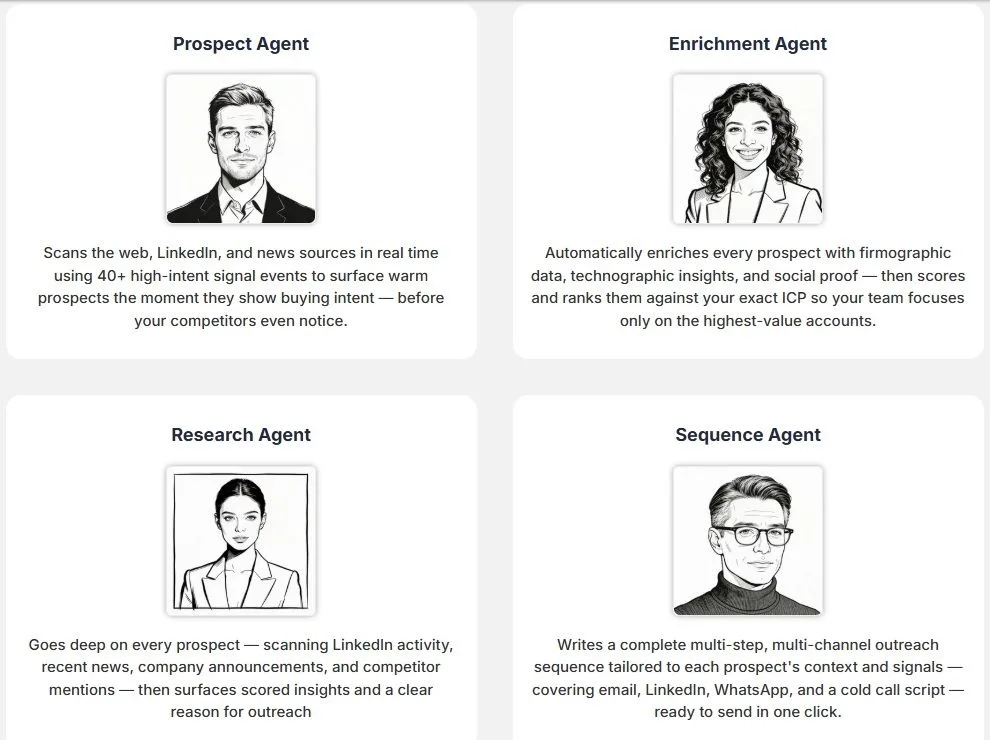
Chapter 1 — The 7 Intent Signals That Drive Replies
This is where the whole system starts. Most teams waste 90% of their time contacting people who aren’t ready to buy. A message sent at the right moment converts 3-5x better than a perfect message sent at the wrong time.
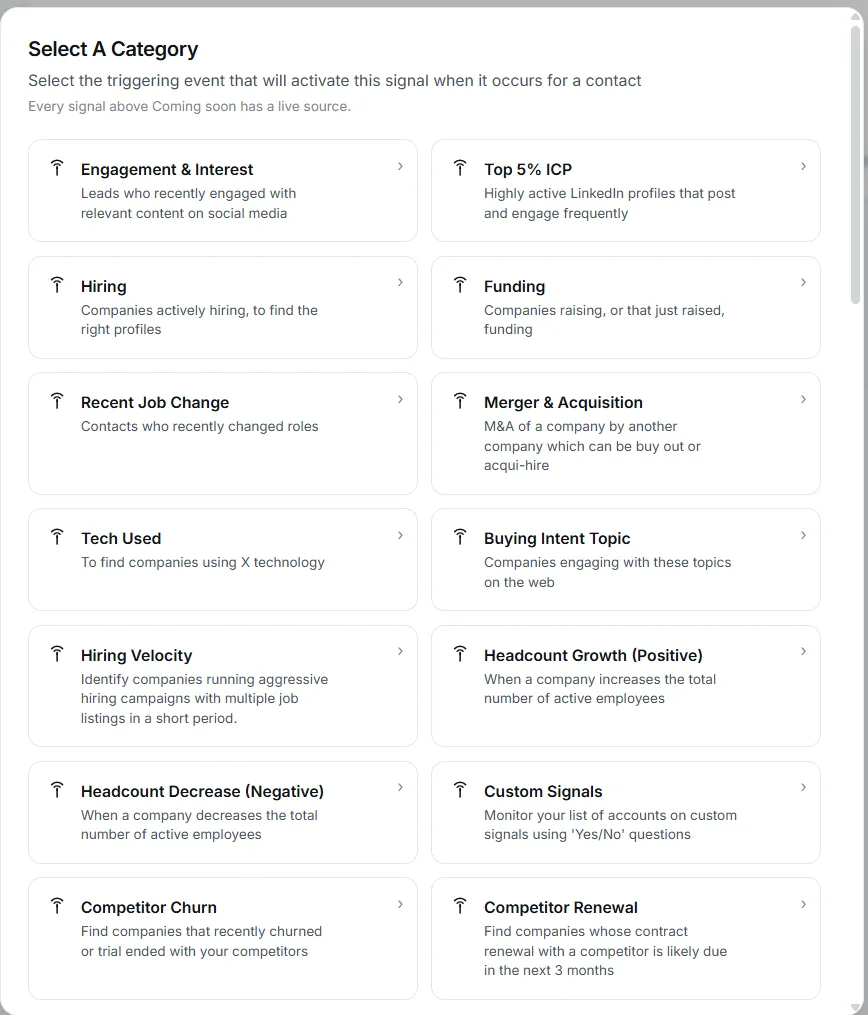
Here are the 7 signals I have Claude track via Coolie. These are the events worth building your entire prospecting motion around.
1. Technology Used (Competitor)
Companies already using a competitor’s product understand the problem and have budget allocated. Show them how your solution is better, faster, or more cost-effective.
2. Competitor Churn or Trial Ended
Companies that recently cancelled a competitor’s subscription or finished a trial. The problem is fresh in their mind. Reach out while they’re still evaluating alternatives.
3. Competitor Renewal
Companies approaching a competitor’s renewal date. Reach out before they commit to another contract.
4. Recent Funding
New capital means new budget. Priorities and tool stacks get re-evaluated in the first 90 days post-announcement.
5. Recent Job Change (< 90 days)
Decision-makers who just joined or got promoted are reviewing existing vendors and looking for quick wins. Help them hit their first-90-days priorities.
6. Buying Intent Topics
Companies engaging with content, product comparisons, or searches related to your solution are telling you what they’re working on.
7. Hiring for Key Roles
Hiring multiple SDRs = scaling outbound. Expanding CS = needs customer management tools. Connect the hire to the business challenge it signals.
Key takeaway: Don’t just target companies that fit your ICP. Target ones showing signs they need your solution right now.
🧠 Full Signal Library → Click Here To Read 🧠
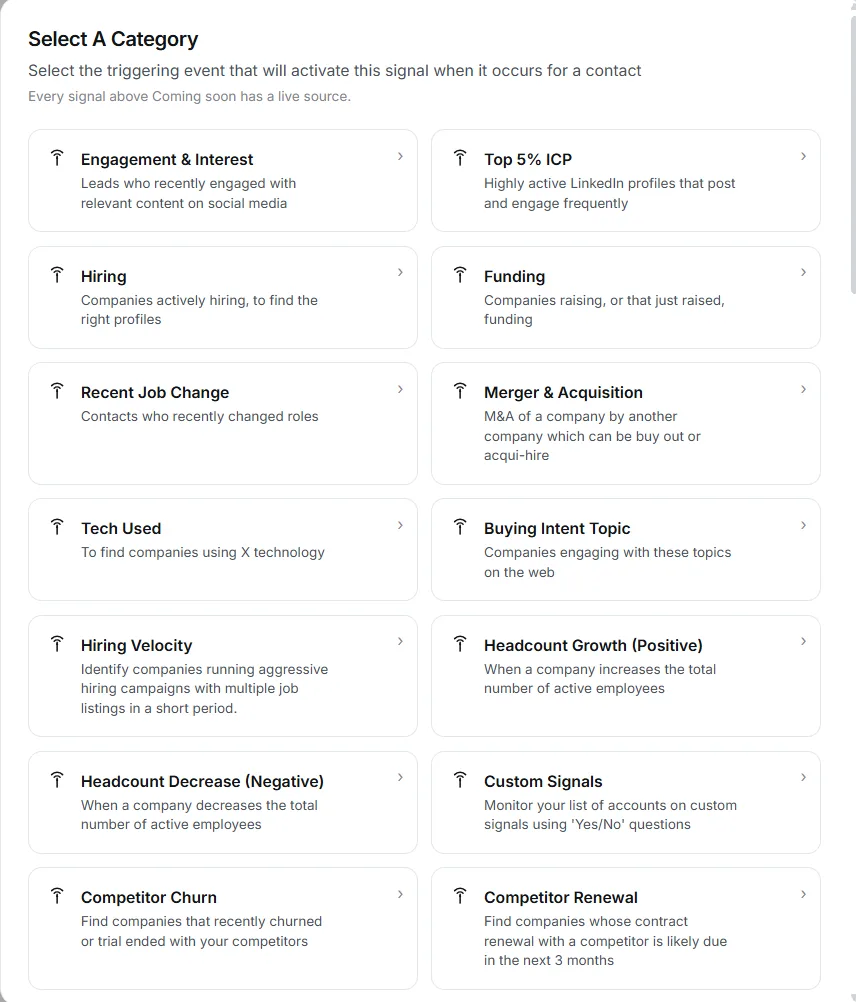
The prompt to turn signal tracking on
Open a Claude chat with the Coolie connector enabled (setup is in the appendix) and run:
Here is my ICP: [paste the ICP]
Set up continuous monitoring in Coolie to detect these 7 signals:
[list the 7 signals]
Prioritize signals X, Y, and Z (strong active intent).
Notify me as soon as a prospect has these signals.
From there, Claude surfaces hot leads automatically.
Chapter 2 — Define Your ICP and Qualify Your Leads
The step 90% of people rush. And the #1 reason “AI campaigns” produce mediocre results.
Before you ask Claude to find prospects, it needs to know exactly who you want to reach.
The ICP framing prompt
Here is my offer: [describe your offer in 3 lines max]
Here is my average deal size: [amount]
Here are my last 5 signed customers: [list with role + industry + company size]

Build my ideal ICP from this data.
Format: exact role, company size, industry, likely buying signals,
common objections, decision triggers.

Be extremely specific. No generic answers.
Claude outputs a strong ICP in under 30 seconds. Save it — you’ll reuse it in every conversation.
The qualification prompt
Once your ICP is defined, Claude can qualify any prospect in one message:
Here is a prospect: [LinkedIn profile or name + company]
Here is my ICP: [paste from above]

Score this prospect 0-10 on:
- ICP fit (role, company, industry)
- Buying maturity (intent signals detected)
- Accessibility (likelihood of reply)

Final verdict: contact now, nurture, or discard.
Justify in 2 lines max.
Run this on dozens of profiles in one session. It’s your first filter.
Finding prospects at scale
Once ICP + signals are set, open a Claude chat and ask it to find matching prospects. They show up automatically in your Coolie account, enriched with the intent signals from Chapter 1.
You can then ask Claude to analyse each profile — or use Coolie’s built-in Research feature that pulls 300+ deep contextual insights per prospect (more on this in the next chapter).
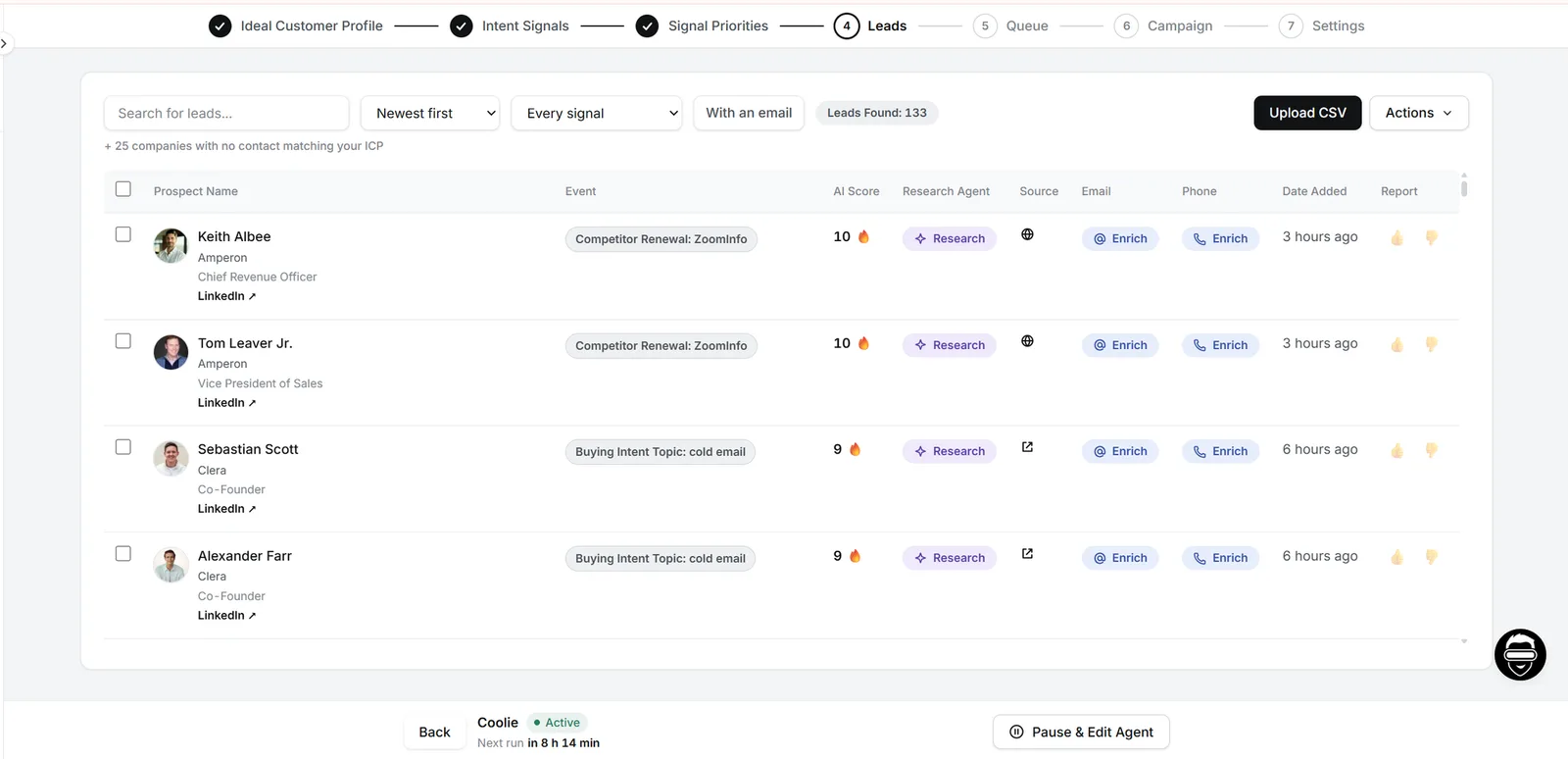
Chapter 3 — Research: Reference Tension, Not Events
You’ve got high-intent leads. Now the harder question: what do you actually say?
Most reps stop at “Congrats on the funding!” That’s why most reps live at ~1% replies.
The funding round isn’t the message. The pressure that funding round creates for your specific buyer — that’s the message.
I call this 3rd-Level Research.
The 3 Levels of Insight
Level 1 — The Observable Event. What happened. The funding round, the hire, the launch. Every seller sees it. Every seller sends the same congratulatory line. Nobody responds.
Level 2 — The Strategic Intent. What they’re doing with it. Where the money is going, what the hire signals about direction. You have context — but your prospect already knows all this. You haven’t earned a reply.
Level 3 — The Tension It Creates. What’s keeping them up at night right now. The predictable internal friction this move creates for this role at this company. The conversation they’re already having with their boss. Walk straight into that conversation and you stop pitching. You start contributing.
A real example: Hireflow raises $12M
Level 1 (what everyone sends):
“Congrats on the round! Would love to chat.” → ignored.
Level 2 (slightly better):
“Saw you’re going upmarket — let’s chat.” → still ignored.
Level 3 (books the meeting):
“Hi John, read the Forbes piece on your enterprise push. As you move into Fortune 1000, are you seeing more resistance from buyers already locked into Workday or SuccessFactors than from competing point solutions? It’s becoming the harder unlock for the teams we work with.”
You’re not referencing the funding. You’re referencing the friction.
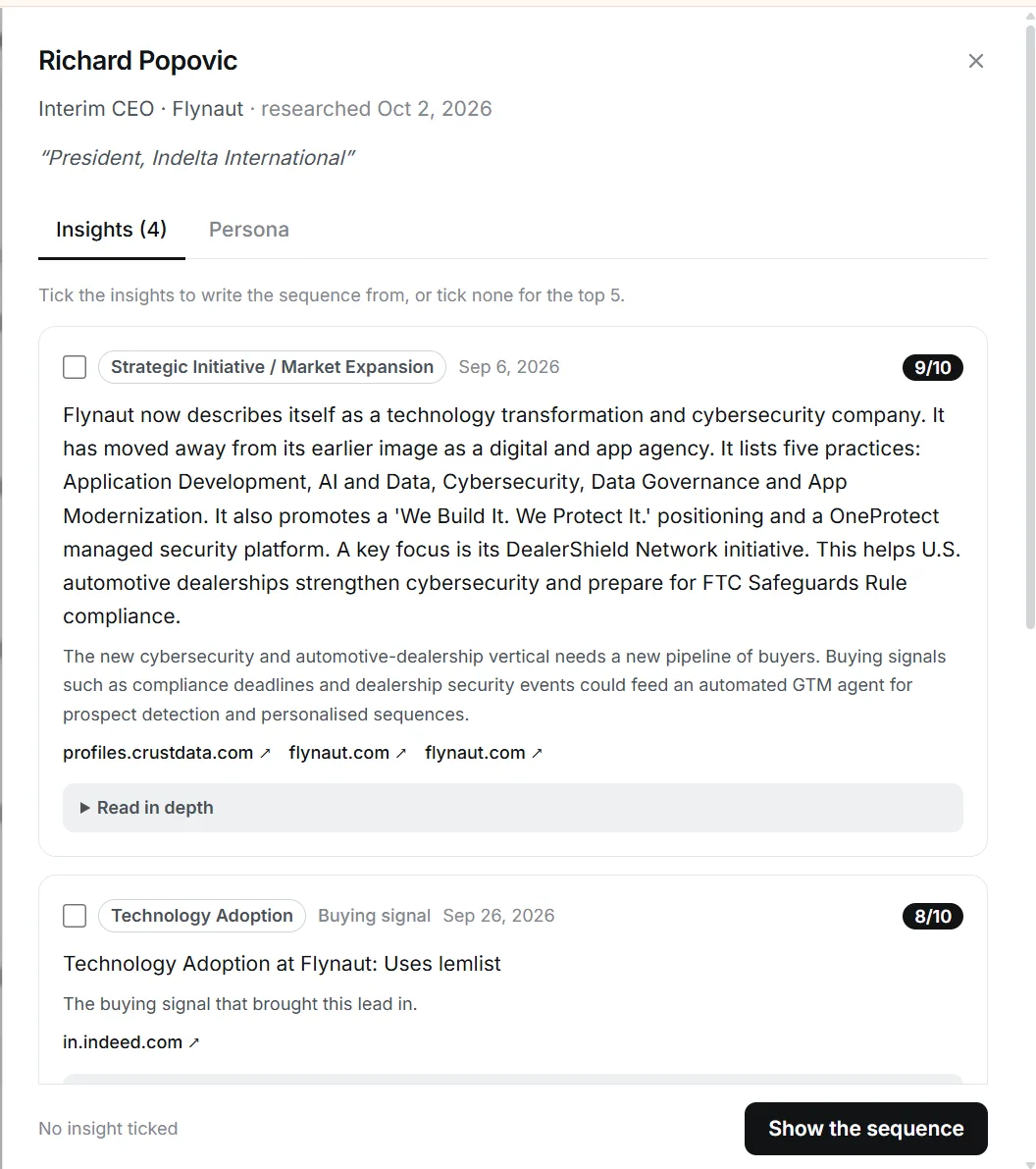
Two ways to run 3rd-level research
Same framework either way. Pick the path that matches your volume.
Path 1 — Manually in Claude
Prospect: [name + role + company]
Signal detected: [paste signal from Coolie]
My offer: [2-line summary]
My ICP: [paste from Chapter 2]

Step 1 — Identify the Level 3 tension this signal creates for
THIS role at THIS company. Not what happened. Not what they're
doing with it. The internal friction it creates for this persona
this week. Answer why me, who now in the sequence

Give me 3-5 specific tensions, ranked by how much it would
dominate this person's thinking right now.
Expect ~15 minutes per prospect. Great for your top strategic accounts.
Path 2 — Automated with Coolie’s Research Agent
For every prospect, Coolie runs the same framework in the background: 300+ contextual data points, scored against your value prop, top 3-5 insights surfaced with a “why this matters right now” explanation per persona.
Click “Research” → “View” on any prospect, or ask Claude in your MCP chat:
Run deep research on the leads in my current campaign.
Surface the top 3 tensions for each one, ranked by relevance
to my value prop.
Same framework. Same quality of thinking. Just fast enough to run across your full pipeline.
| Situation | Path |
|---|---|
| 5-10 high-value named accounts | Manual prompt — thinking is the point |
| 30+ signal-triggered prospects per day | Research Agent |
| Testing a new ICP | Manual first, then automate |
| Scaling a proven motion | Research Agent all the way |
My own week: Research Agent on the full pipeline, 20 minutes a day reviewing top tensions, manual prompt on 2-3 strategic accounts where I want to think hard myself.
Chapter 4 — Message Framework + Follow-Up Sequence
Now that research is done, the writing is almost mechanical.
The 4-block message framework
A great LinkedIn message in 2026 doesn’t look like SDR copywriting. It looks like something a thoughtful human would write to another thoughtful human.
Block 1: Observed trigger (1 line)
The precise signal that made you reach out. Not “I saw your profile.” Something concrete.
“Saw your post about technical sourcing pain at Series A startups.”
Block 2: Connection to the tension (1 line)
Show you understand the friction, not just the event.
“The teams I work with hit the exact same wall around month 4.”
Block 3: Open question (1 line)
No pitch. A real opening.
“Curious how you’re handling it internally right now.”
Block 4: Soft exit (1 line)
Remove pressure. Keep dignity.
“No reply = no problem, I’ll assume it’s not a fit right now.”
The generation prompt
Prospect: [name + role + company]
Level 3 tension (from Chapter 3 research): [paste tension]
My offer: [2-line summary]

Generate 3 opening message variants following this structure:
Block 1: Concrete observed trigger
Block 2: Connection to the tension
Block 3: Open question (no pitch)
Block 4: Soft exit

Max 60 words per message. Human tone. No corporate jargon.
Reference the tension, not just the event.
Pick the one that fits best. Send via Coolie.
The 3-step follow-up sequence
Most people send one message, wait, drop a generic “just following up” five days later. Result: 2% reply rate. Here’s what actually works.
Day 0 — Opening message. The 4-block structure above.
Day 2 — Contextual follow-up. Not “bumping this.” Bring something new tied to the same tension: an article, a stat, a sharper question.
“Just found this study on exactly the Workday lock-in problem [link]. Curious what you think.”
Day 5 — Breakup. Signal it’s your last attempt without guilt-tripping. Often triggers a reply out of politeness or curiosity.
“I won’t push further. If this comes back on your desk, my door’s open.”
Day 30 — Signal-based re-entry. If Coolie detects a new intent signal from that prospect weeks later, Claude re-engages with a completely new hook. Not a continuation of the dead thread.
The sequence prompt
Prospect currently in sequence: [name + message history]
New signals detected since last message: [signals]

Generate the next step based on timing:
- > 9 days with no reply → breakup message
- New signal detected → full reset with a new hook
- Otherwise → contextual follow-up on the same tension
Claude manages timing. You approve.
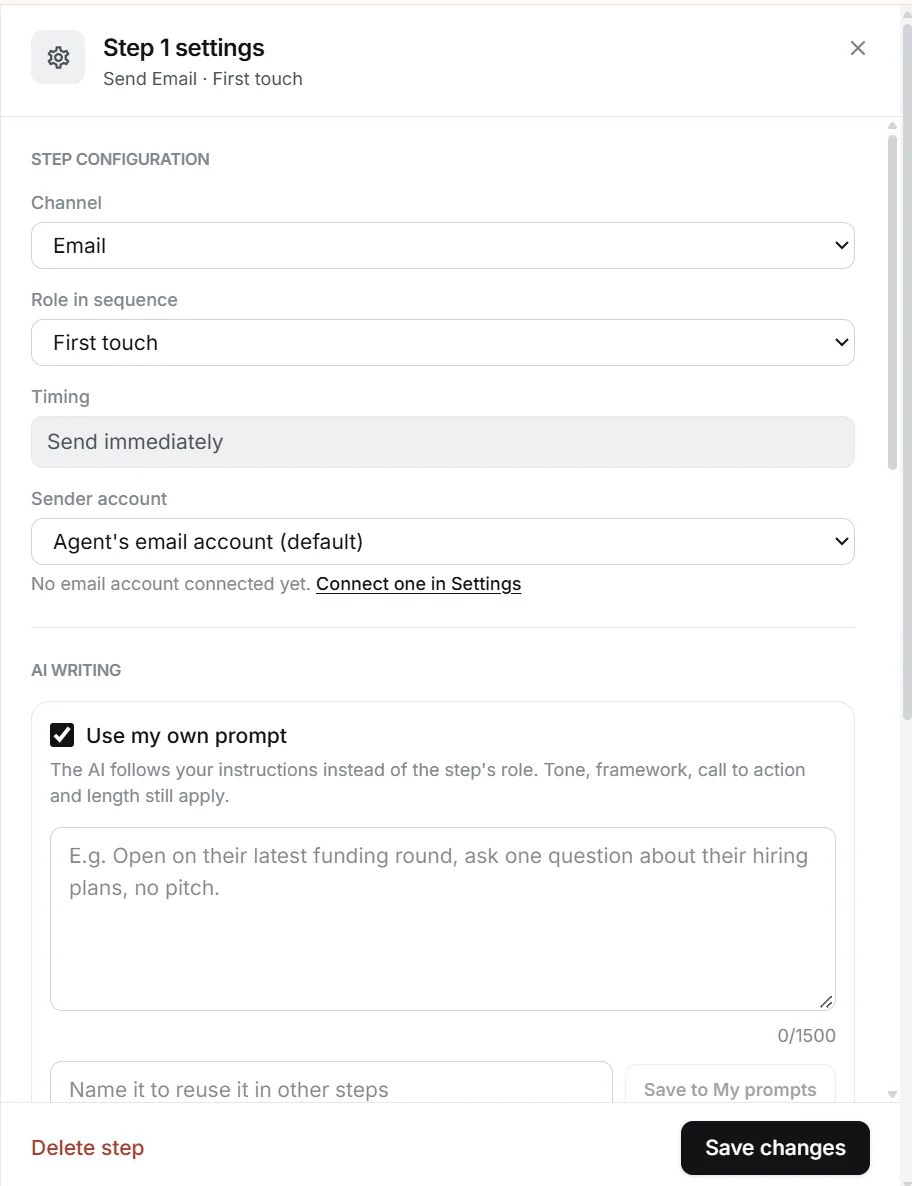
Chapter 5 — LinkedIn + Email Outbound Orchestration
A stack that only runs on email misses 30-40% of opportunities. Many decision-makers check LinkedIn & read email daily.
The point isn’t to spam across channels. It’s to follow the same conversation on the channel where the prospect actually is.
The orchestration principle
→ First touch on LinkedIn (where the signal was detected)
→ If no reply after 2 messages, switch to email
→ Cold call in between a full email + LinkedIn cycle
The key: every channel references the same Level 3 tension. Different angle, same conversation. One voice across four surfaces, not four campaigns in one inbox.
The 7-day multi-channel cadence that works
- Day 1 AM — LinkedIn connection request, no message
- Day 1 PM — Email #1: tension + question, ~60 words, no pitch
- Day 2 — LinkedIn DM (if accepted): conversational, same tension
- Day 3 — Cold call. Opener references prior touches and the same tension. Objection handlers tied to the same friction.
- Day 4 — Email #2: new angle on the same tension (not “bumping this”)
- Day 5 — Follow-up on LinkedIn #2 new angle on the same tension (not “bumping this”)
Hand-writing this for one prospect takes ~20 minutes. For 30 prospects a day it’s not happening manually.
Coolie’s Sequence Agent takes the top-ranked tension from Chapter 3 and writes the full 7-day multi-channel sequence (email + LinkedIn) — all anchored to the same tension. You edit and approve.
The orchestration prompt
Prospect: [name + email if available + LinkedIn]
Messages already sent and status: [history]
Prospect's recent activity: [LinkedIn activity + email opens]
Level 3 tension anchor: [paste tension]

Recommend the next channel and the next message:
- LinkedIn inactive > 7 days → switch to email
- Email opened 2x no reply → back to LinkedIn, fresh angle on same tension
- During the email & LI follow-up → cold call script with same anchor
- Otherwise → continue on current channel
Coolie handles sending across email and LinkedIn. Claude orchestrates the decision.
Chapter 6 — Your First Week
Follow this order. No “9 calls in 2 days” promises — that comes later, after the system has data to learn from.
Day 1 (30 min)
- Run the MCP + Coolie setup (appendix)
- Build your ICP (Chapter 2)
Day 2 (45 min)
- Turn on the 7 intent signals (Chapter 1)
- Let it run 24 hours so first leads come in
Day 3 (1 hour)
- First qualification session: Claude outputs 20-30 leads
- Keep 10-15 priority leads
- Run 3rd-level research manually on your top 5 (Chapter 3)
- Launch the sequence for 7-10 of them (Chapter 4)
Days 4-5
- Watch the first replies
- Approve the follow-ups Claude proposes
- Adjust your ICP if needed
Days 6-7
- Scale to 20 new prospects in sequence
- Turn on email + LinkedIn integration for non-responders
After one week — a system running.
After one month — a pipeline.
After three months — 18+ qualified meetings a week, consistently.
Appendix — MCP + Coolie Setup (5 minutes)
The one-time technical setup. Do this when you’re ready to run the system — not before you’ve decided it’s for you.
You need:
- A Claude account (Free or Pro both work)
- A LinkedIn account
- A professional email account
- A Coolie account (free trial available)
Step 1 — Open Claude
Go to claude.ai or open Claude Desktop. Click “Customize” or go directly to claude.ai/customize/connectors.
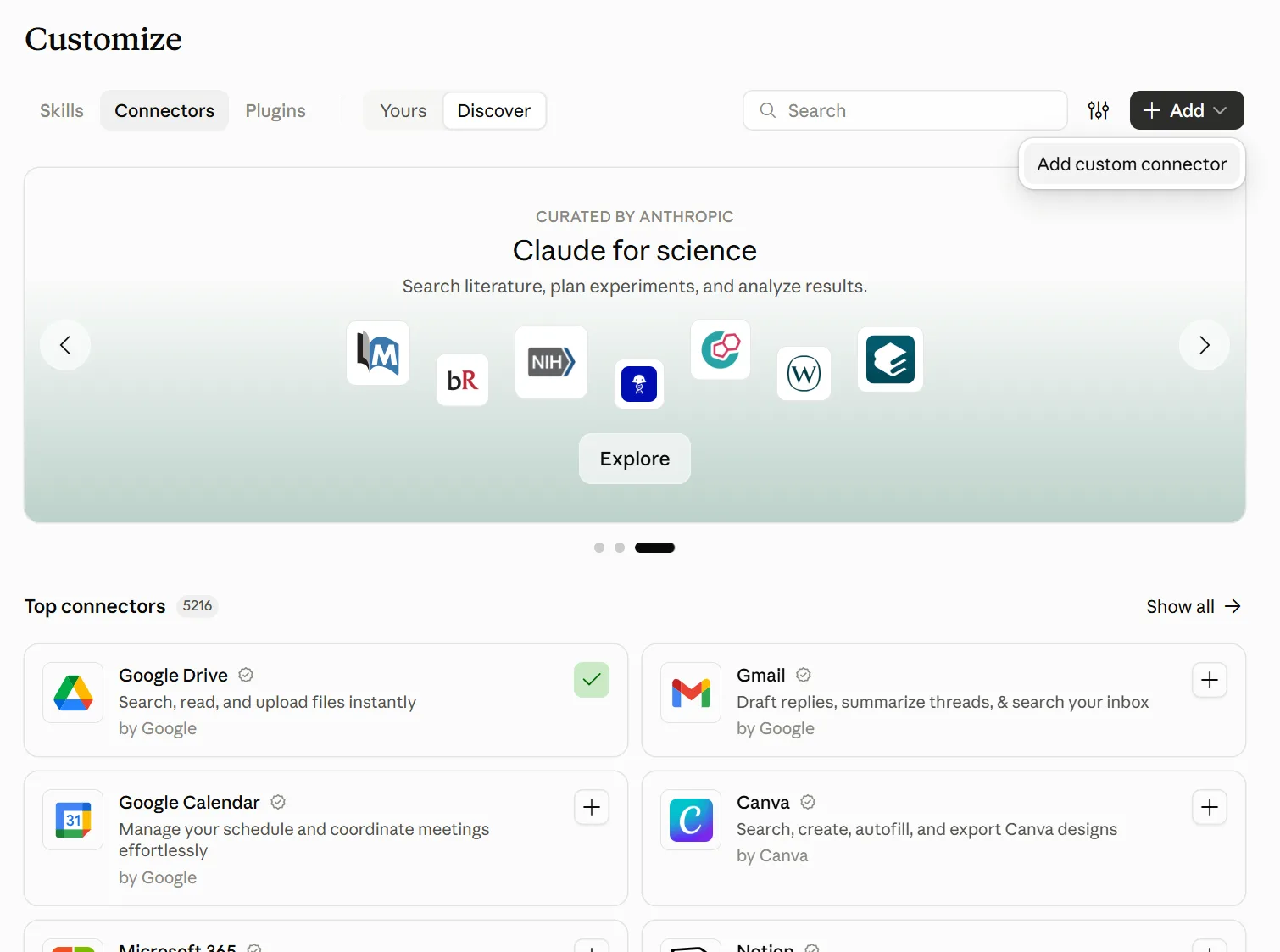
Step 2 — Add a custom connector
Click “Connectors” → the “+” → “Add custom connector.”
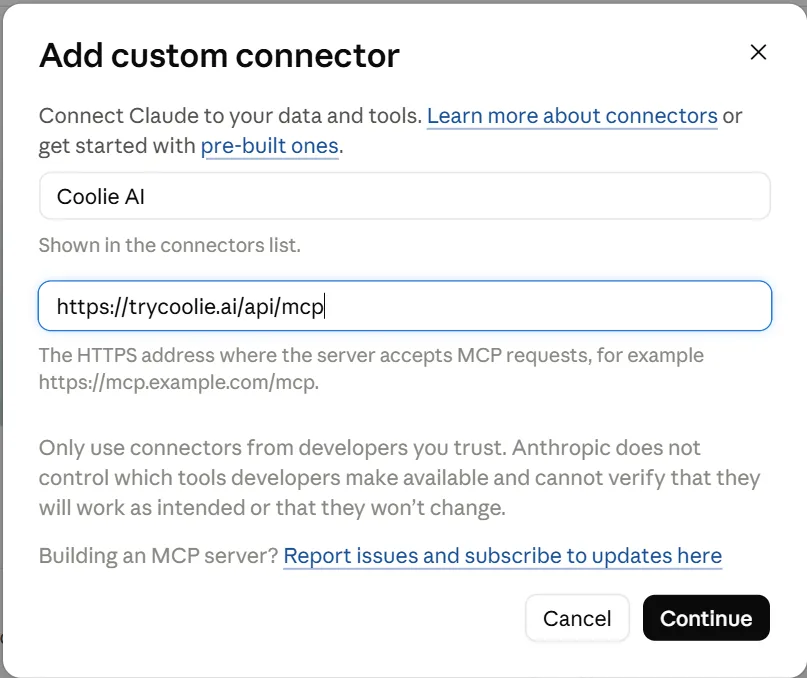
Step 3 — Add Coolie
Name it “Coolie AI” and paste this URL:
https://trycoolie.ai/api/mcpClick Continue.
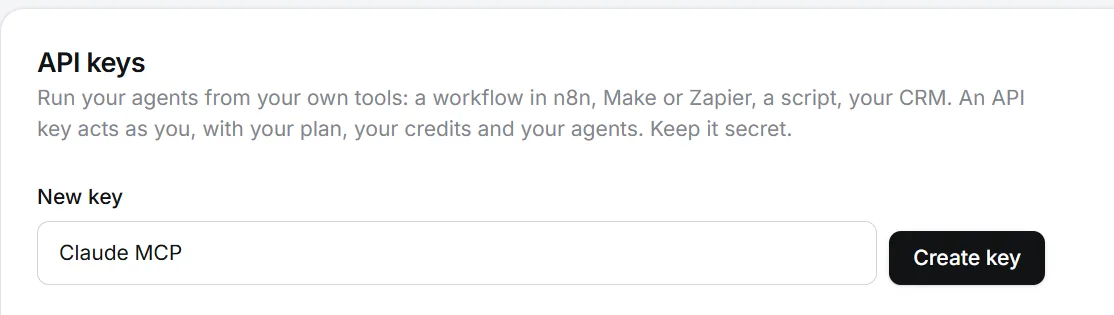
In your Coolie account go to Settings → API Key → Create New Key. Copy and store it.

Back in Claude: in request headers, select x-api-key and paste your API key. Click Add,
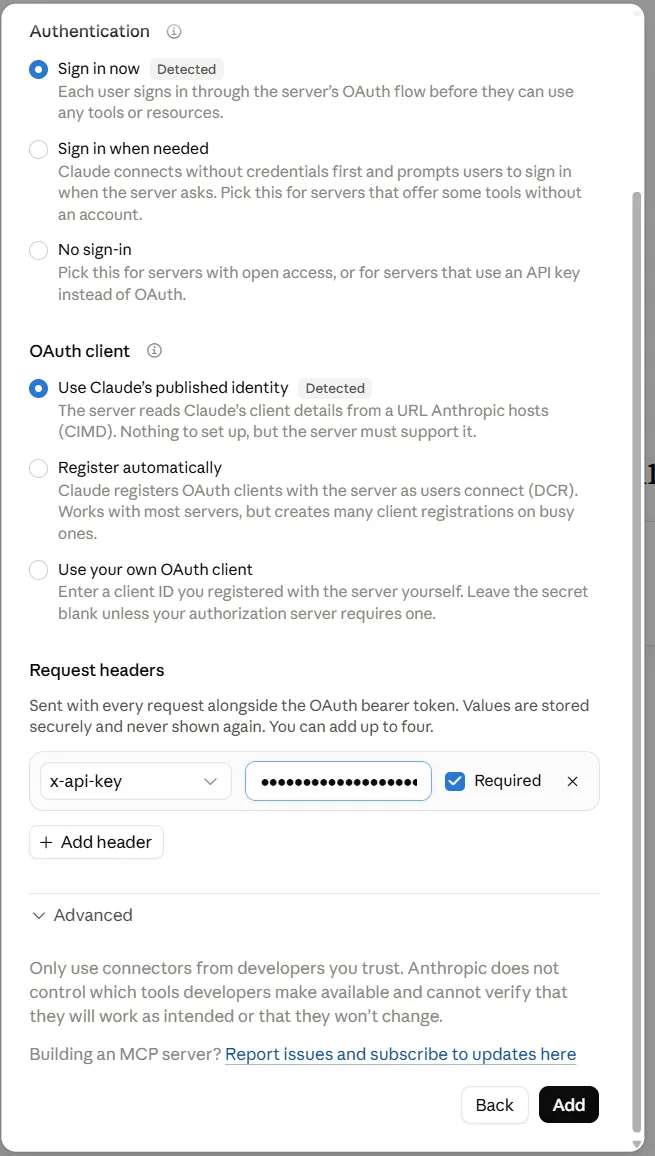
then click on Allow.
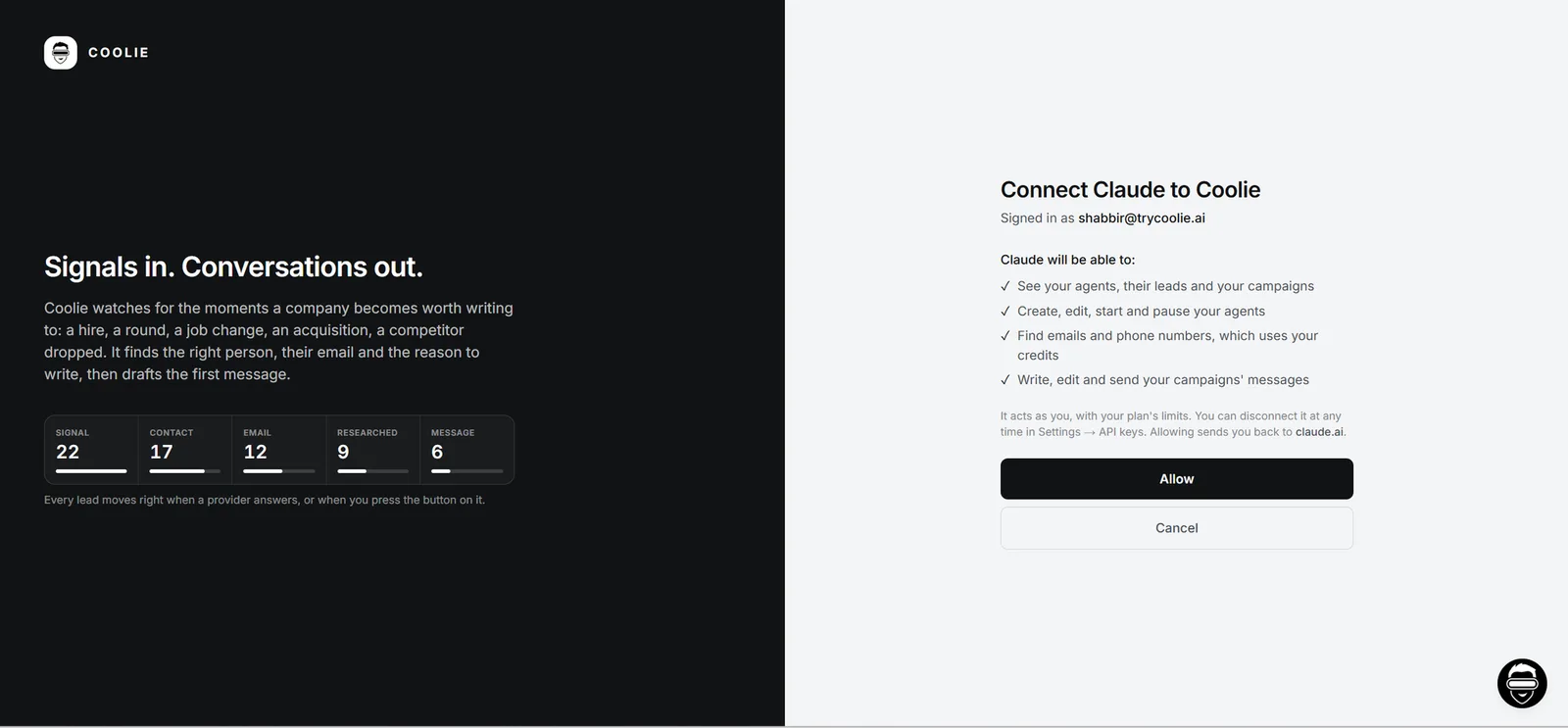
Step 4 — Enable the connector
In any Claude chat, click the “+” at bottom-left and enable Coolie AI under connectors. Or go here and click “Connect” next to Coolie.

Done. Claude now has read/write access to your Coolie account. Head back to Chapter 1 and start running the system.
Get Started
→ Create a free Coolie account: trycoolie.ai (7-day trial)
Most teams have signals running through their pipeline within 10 minutes of signing up. If you want a hand setting it up, message us inside the product — our team replies in under an hour and walks you through your first campaign live.
Built for B2B SaaS founders prospecting solo, GTM and Sales teams running outbound at scale, and sales leaders who want their reps spending time on conversations instead of research tabs.
Happy prospecting. 🚀
— Shabbir, Co-founder, Coolie
Real Results From Teams Running This System ⬇️
1. How Recruiterflow's Sales Team Tripled Reply Rates in One Week
→ Click here to read the full case-study
2. How Datatracks 6x Email Reply Rates and Gave ~208 Hours
→ Click here to read the full case-study