Blog · 3 min read
Day #1 (7-Day Coolie Program to Book More Meetings)
Day 1: Define your ICP
Delighted to see you on Coolie. You’re officially on DAY 1 of your cold outbound journey.
And we’re starting with the #1 step that makes or breaks your success - defining your Ideal Customer Profile (ICP).
Why is this important?
Here's how most people have always done it:
They set a few static filters (industry, title, company size), enrich a few thousand contacts one by one, and end up with a giant list of leads… but with zero idea whether any of them are actually in the market to buy. No signals. No timing. Just names in a spreadsheet, hoping someone bites.
That's how you end up with a 1% reply rate.
Coolie flips this completely — and it does it in two layers.
Layer 1: Static filters (the WHO)
This is the classic ICP — it tells your agent the type of company and person you want to reach.
- Industry — Where do your best customers work? Example: Software Development, Business Consulting, etc.
- Company Size — Focus on the right-sized businesses. Example: 11–50 employees.
- Job Titles / Decision Makers — Who makes the call? Example: VP of Sales, Marketing Managers, CTOs.
- Company Location — Example: US, UK, India.
On their own, static filters give you a cold list — people who might buy someday. To go from 1% to 14–47% reply rates, you need the second layer.
Layer 2: Intent signals / events (the WHEN)
This is what makes Coolie different. An intent signal is a real-world event that tells you someone has your problem right now — they're raising their hand, even if they don't realize it yet.
A few examples of the difference:
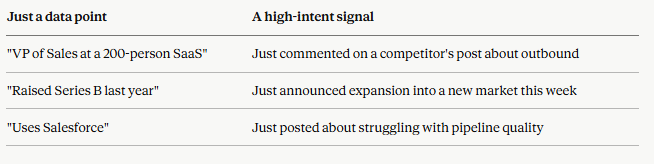
Coolie tracks 40+ of these events in real time. The ones most teams start with:
- Competitor engagement — people liking or commenting on your competitors' posts
- Influencer engagement — people engaging with thought leaders in your niche
- Job changes — prospects who just started a new role (fresh budget, fresh mandate)
- Funding rounds — companies that just raised and are ready to spend
- Top 5% of ICP — the most active, in-market profiles in your target market
- Engagement & interest — leads interacting with relevant LinkedIn content
- Your company — people engaging directly with you or your team
- Vulnerability — companies that recently faced a cyber-attack or threat
When you combine both layers, your agent stops surfacing random names and starts surfacing the right person, at the exact moment they care. That's quality over quantity.
How to set this up in Coolie (5 minutes)
- Log into Coolie and open your agent setup.
- Fill in your static filters (the 4 ICP fields above) — this defines who.
- Switch on your intent signals — pick 2–3 events to start (we recommend Competitors + Job Changes + Funding for most teams).
- Save. Your Prospect Agent starts scanning immediately and begins surfacing high-intent leads that match both your ICP and a live signal.
That's it. No buying lists. No manual enrichment. Just warm leads showing up in your pipeline.
What’s Next?
Go set up your ICP + your first signals inside Coolie. Don't overthink the signals — start with 2–3 and you can always add more.
Tomorrow, we'll move to the next step — turning those high-intent leads into conversations that actually get replies.
Remember: the right ICP isn't about more leads. It's about the right ones, at the right time. That's how meetings get booked.
This is Day 1. Nail your ICP and set yourself up for success.
Take care 🙌
PS: Kickstart your Coolie journey
🗓️ Book a demo with our team